
To create a To-Do list using AngularJS, you will need to follow these steps: 1. Set up your AngularJS project by including the AngularJS library in your HTML file. <code>html <!DOCTYPE html> <html ng-app="todoApp"> <head> <title>To-Do List</title> <script src="https://ajax.googleapis.com/ajax/libs/angularjs/1.7.9/angular.min.js"></script> </head> <body> <div ng-controller="todoController"> <!– Your to-do list HTML code goes here –> </div> <script src="app.js"></script> […]
Tag Archives: web development
AngularJS animations are a powerful tool that can add life and interactivity to your user interface. With animations, you can create smooth transitions, fade in and out elements, and add visual effects to make your UI more engaging and user-friendly. To get started with AngularJS animations, you’ll need to include the ngAnimate module in your […]
To create a custom directive in AngularJS, you need to follow these steps: 1. Define the directive: Use the `directive` method of the AngularJS module to define a new directive. The method takes two parameters: the name of the directive and a factory function that returns the directive definition object. <code>javascript angular.module(‘myApp’, []) .directive(‘myDirective’, function() […]
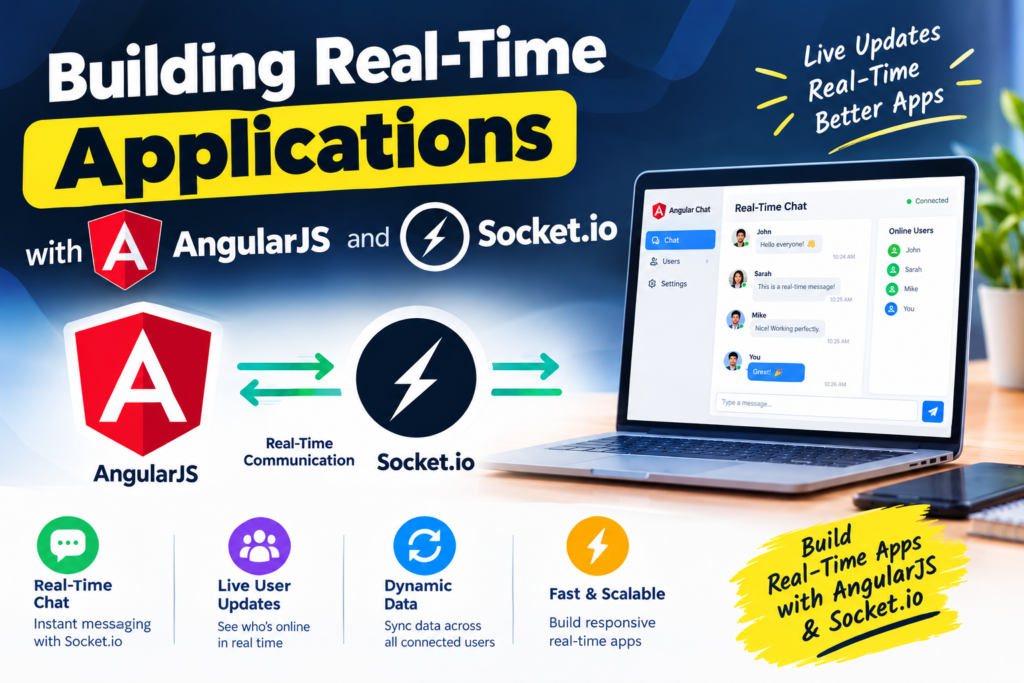
AngularJS is a popular JavaScript framework for building web applications. It provides a structured way to develop dynamic and interactive web pages. Socket.io is a JavaScript library that enables real-time, bidirectional communication between web clients and servers. Combining AngularJS and Socket.io allows developers to build real-time applications that can update data in real-time without the […]
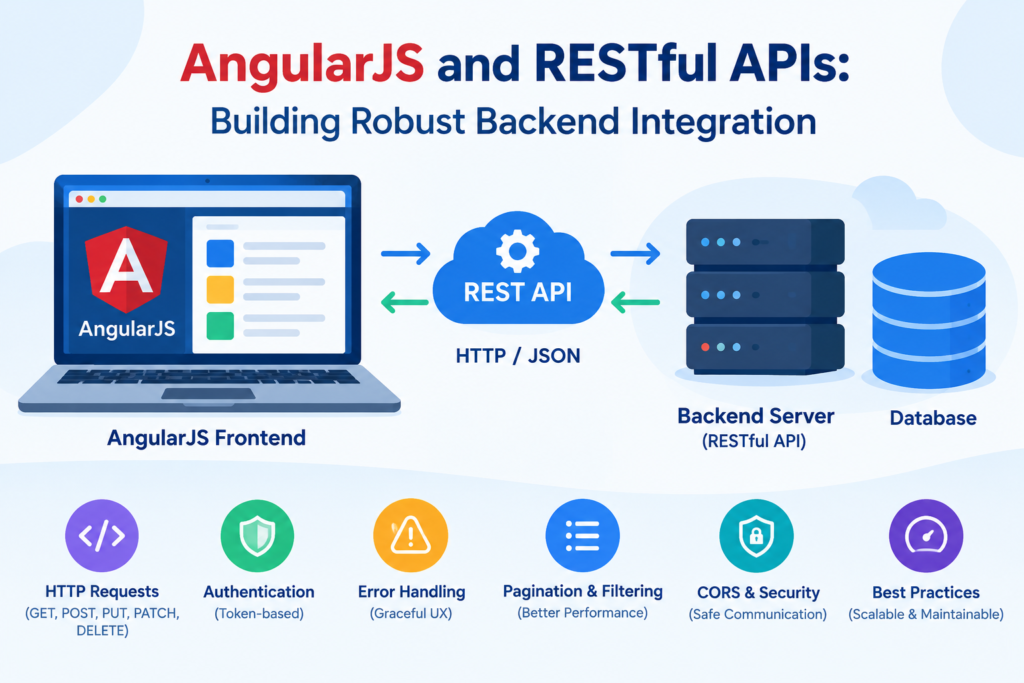
AngularJS is a popular JavaScript framework that can be used to build dynamic web applications. It provides a powerful way to interact with RESTful APIs and retrieve data from a server. To use AngularJS with RESTful APIs, you can follow these steps: 1. Set up your AngularJS application: Start by including the AngularJS library in […]
There are several ways to optimize performance in AngularJS applications: 1. Minify and compress your code: Minifying and compressing your code reduces its size, making it load faster. Use tools like UglifyJS or Closure Compiler to minify your JavaScript code, and Gzip or Brotli compression to compress your files. 2. Use lazy loading: Lazy loading […]
AngularJS is a popular JavaScript framework for building single-page applications (SPAs). SPAs are web applications that load a single HTML page and dynamically update the content on that page without requiring a full page reload. Here are the steps to build a single-page application with AngularJS: 1. Set up your development environment: Install Node.js and […]
AngularJS routing is a powerful feature that allows you to build single-page applications (SPAs) by dynamically changing the content of a web page without reloading the entire page. It enables you to create a seamless user experience by providing smooth transitions between different views or pages within your application. To use routing in AngularJS, you […]
AngularJS is a popular JavaScript framework developed by Google for building dynamic web applications. It provides a structured way to organize and manage your code, making it easier to develop and maintain complex applications. In this step-by-step tutorial, we will guide you through the process of setting up a basic AngularJS application and building a […]
When it comes to choosing the right framework for your web development project, AngularJS and React are two popular options. Both frameworks have their own strengths and weaknesses, so it’s important to consider your project requirements and goals before making a decision. Here are some factors to consider when choosing between AngularJS and React: 1. […]
To create a responsive web design with AngularJS, you can follow these steps: 1. Use a responsive CSS framework: AngularJS does not have built-in responsive design features, so you will need to use a CSS framework like Bootstrap or Foundation to handle the responsive layout. These frameworks provide a grid system and responsive classes that […]
Two-way data binding in AngularJS is a feature that allows the synchronization of data between the model and the view. It means that any changes made to the model will automatically update the view, and any changes made to the view will update the model. In AngularJS, two-way data binding is achieved using the ng-model […]
Directives are one of the most powerful features in AngularJS. They allow you to extend HTML with custom elements and attributes, and create reusable components that encapsulate behavior and presentation logic. With directives, you can create your own HTML tags and attributes, and define how they should be rendered and behave. This allows you to […]
AngularJS is a JavaScript framework that allows developers to build dynamic web applications. It provides a set of tools and features that make it easy to create interactive and responsive user interfaces. One of the key features of AngularJS is its two-way data binding. This means that any changes made to the data in the […]

ES6, also known as ECMAScript 2015, introduced several new features and improvements to JavaScript that make it easier to build scalable applications. In this article, we will explore some of these features and how they can be used to build scalable applications. 1. Modules: ES6 introduced a standardized module system that allows developers to split […]
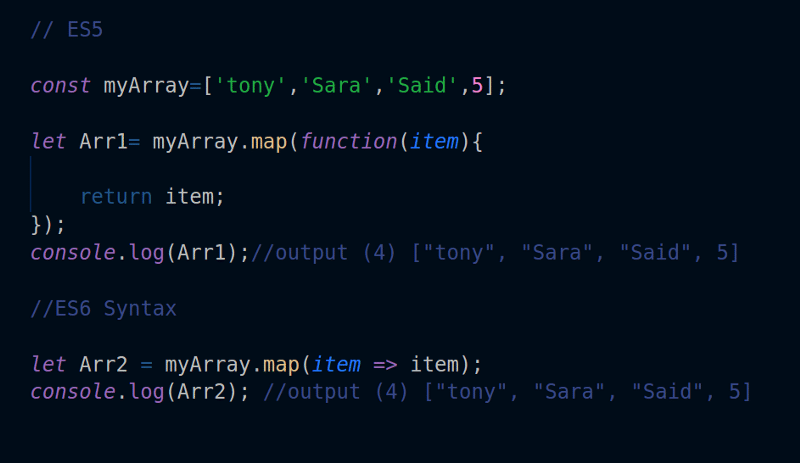
1. Arrow Functions: Arrow functions provide a more concise syntax for writing functions in JavaScript. They have a shorter syntax and automatically bind the context of the surrounding code. Example: “` const add = (a, b) => a + b; “` 2. Template Literals: Template literals allow for easier string interpolation and multiline strings in […]
ES6, also known as ECMAScript 2015, is the latest version of the JavaScript language. It introduced many new features and improvements to make JavaScript more powerful and easier to work with. If you’re new to ES6 and want to get started, this beginner’s guide will help you understand the basics and get you up and […]
ES6, also known as ECMAScript 2015, is a major update to the JavaScript language that brings a wide range of new features and improvements. It revolutionizes JavaScript development by making the language more powerful, expressive, and easier to work with. One of the most significant additions in ES6 is the introduction of block-scoped variables with […]
1. Use arrow functions: Arrow functions provide a more concise syntax for writing functions. They automatically bind the context of `this` to the surrounding scope, making it easier to work with callbacks and event handlers. 2. Destructuring assignment: Destructuring allows you to extract values from arrays or objects and assign them to variables in a […]
ES6, also known as ECMAScript 2015, is a major update to the JavaScript language. It introduced many new features and improvements that make JavaScript more powerful and easier to work with. Here are some of the key features of ES6 that you need to know: 1. Arrow Functions: Arrow functions provide a more concise syntax […]
ES6, also known as ECMAScript 2015, is the sixth major release of the ECMAScript language specification. It introduced many new features and syntax enhancements to JavaScript, making it more powerful and expressive. In this comprehensive guide, we will cover the basics of ES6 and its key features. 1. Block-Scoped Variables: ES6 introduced two new keywords, […]
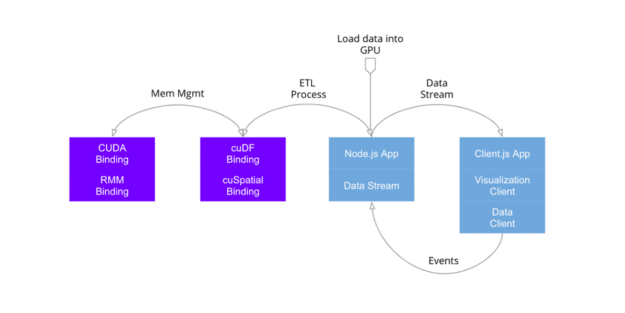
Node.js is a powerful runtime environment that allows you to run JavaScript on the server-side. It provides a range of features and modules that make it easy to build scalable and efficient web applications. One popular use case for Node.js is data visualization, where you can use it to process and manipulate data before rendering […]
To implement user authentication and authorization in PHP, you can follow these steps: 1. Create a database table to store user information, including username, password, and any other relevant data. 2. Create a registration form where users can enter their information and submit it to be stored in the database. Use the PHP `password_hash()` function […]
To build a RESTful API with Node.js and Hapi.js, follow these steps: 1. Set up a new Node.js project by creating a new directory and running `npm init` to generate a `package.json` file. 2. Install Hapi.js by running `npm install hapi`. 3. Create a new file, `server.js`, and require the necessary modules: “`javascript const Hapi […]
Building a CRM system with Ruby on Rails involves several steps. Here is a high-level overview of the process: 1. Define the requirements: Start by understanding the specific needs of your CRM system. Identify the key features, such as contact management, lead tracking, sales pipeline management, and reporting. 2. Design the database schema: Create a […]
To implement user authentication in PHP, you can follow these steps: 1. Create a database table to store user information, such as username and password. You can use a tool like phpMyAdmin to create the table or execute SQL queries directly. “`sql CREATE TABLE users ( id INT AUTO_INCREMENT PRIMARY KEY, username VARCHAR(255) NOT NULL, […]
To build a recipe sharing website with Ruby on Rails, you can follow these steps: 1. Set up your development environment: – Install Ruby on your machine. – Install Rails using the command `gem install rails`. – Install a database system like PostgreSQL or MySQL. 2. Create a new Rails application: – Open your terminal […]
To create a task management system with Ruby on Rails, you can follow these steps: 1. Set up a new Rails application by running the following command in your terminal: “` rails new task_management_system “` 2. Change into the project directory: “` cd task_management_system “` 3. Generate a Task model and migration file: “` rails […]
PHP templating engines are tools that simplify web development by separating the presentation layer from the business logic layer. They provide a way to create reusable templates that can be easily maintained and updated. One of the main advantages of using a templating engine is that it allows developers to focus on the logic of […]
To create a forum using Ruby on Rails, you can follow these steps: 1. Set up a new Rails application by running the following command in your terminal: “` rails new forum “` 2. Change into the newly created application directory: “` cd forum “` 3. Generate the necessary models, controllers, and views for the […]

To create dynamic forms with PHP, you can follow these steps: 1. Start by creating an HTML form with the necessary input fields. For example, you can create a form with a text input field and a submit button: “`html <form method="POST" action="process.php"> <input type="text" name="name" placeholder="Enter your name"> <input type="submit" value="Submit"> </form> “` 2. […]
Building scalable web applications with Node.js involves using various techniques and tools to ensure that the application can handle a large number of concurrent users and requests without sacrificing performance. Here are some key considerations and best practices for building scalable web applications with Node.js: 1. Use asynchronous programming: Node.js is built on an event-driven, […]
Building a music streaming service with Ruby on Rails involves several steps. Here is a high-level overview of the process: 1. Set up a new Rails application: Start by creating a new Rails application using the `rails new` command. This will generate the basic structure and files needed for your project. 2. Design the database […]
PHP extensions are modules that can be added to the PHP programming language to expand its functionality. These extensions provide additional features and capabilities that are not available in the core PHP language. There are numerous PHP extensions available, each designed to address specific needs and requirements. Some of the most commonly used PHP extensions […]
To create a music streaming platform with Ruby on Rails, you can follow these steps: 1. Set up your development environment: – Install Ruby on Rails on your machine. – Set up a database (e.g., PostgreSQL) for storing music data. 2. Create a new Rails application: – Open your terminal and run the command `rails […]
To implement search functionality in Ruby on Rails, you can follow these steps: 1. Add a search form to your view: – In your view file (e.g., `index.html.erb`), add a form that allows users to enter their search query. For example: “`ruby <%= form_tag search_path, method: :get do %> <%= text_field_tag :query, params[:query], placeholder: "Search…" […]
To build a RESTful API with Node.js and Express, follow these steps: 1. Set up a new Node.js project by creating a new directory and running `npm init` to generate a `package.json` file. 2. Install Express by running `npm install express`. 3. Create a new file, such as `index.js`, and require Express: “`javascript const express […]
Creating a blogging platform with Node.js and Express can be a great way to showcase your web development skills and provide a platform for users to share their thoughts and ideas. In this guide, we will walk through the steps to set up a basic blogging platform using Node.js and Express. Step 1: Set up […]
To create a recipe sharing platform with Ruby on Rails, you can follow these steps: 1. Set up your Ruby on Rails environment: – Install Ruby on your system. – Install Rails using the command `gem install rails`. – Create a new Rails application using the command `rails new recipe-sharing-platform`. 2. Design your database schema: […]
To build a job board with Ruby on Rails, you can follow these steps: 1. Set up a new Rails application by running the following command in your terminal: “` rails new job_board “` 2. Change into the project directory: “` cd job_board “` 3. Generate a scaffold for the job model, which will create […]
Node.js and MongoDB are indeed a perfect match for database integration. Here are a few reasons why: 1. JavaScript-based: Both Node.js and MongoDB use JavaScript as their primary programming language. This makes it seamless to work with both technologies, as developers can use the same language for both the server-side and database operations. 2. Asynchronous […]
Ruby on Rails is a powerful web development framework that can be used to create data visualization applications. Here are some steps to get started with data visualization using Ruby on Rails: 1. Install Ruby on Rails: First, make sure you have Ruby and Rails installed on your machine. You can install them using the […]

To implement Role-Based Access Control (RBAC) in Ruby on Rails, you can follow these steps: Step 1: Set up the database tables Create the necessary database tables to store roles, permissions, and user-role mappings. You can use a migration file to create these tables. For example: “`ruby rails generate migration CreateRoles name:string rails generate migration […]
To build a task management system with Ruby on Rails, you can follow these steps: 1. Set up a new Rails application by running the following command in your terminal: “` rails new task_management_system “` 2. Change into the project directory: “` cd task_management_system “` 3. Generate a Task model and migration file: “` rails […]
Creating a CMS (Content Management System) with PHP can be a complex task, but with a step-by-step tutorial, you can easily build your own CMS from scratch. In this tutorial, we will cover the basic steps involved in creating a CMS using PHP. Step 1: Set Up Your Development Environment To begin, you need to […]
To create a chat application with Ruby on Rails, you can follow these steps: 1. Set up a new Rails application by running the following command in your terminal: “` rails new chat_app “` 2. Change into the newly created application directory: “` cd chat_app “` 3. Generate a model for the chat messages: “` […]
Integrating PHP with JavaScript can create a powerful combination that allows for dynamic and interactive web applications. PHP is a server-side scripting language that is used to generate dynamic web pages, while JavaScript is a client-side scripting language that is used to add interactivity to web pages. Here are some ways in which PHP and […]
Integrating payment gateways in Ruby on Rails involves several steps. Here is a general guide on how to do it: 1. Choose a Payment Gateway: There are several payment gateways available, such as Stripe, PayPal, Braintree, etc. Choose the one that suits your requirements and sign up for an account. 2. Install the Payment Gateway […]
Ruby on Rails is a popular web development framework that allows developers to build robust and scalable applications. While Rails is primarily designed for building traditional request-response style applications, it can also be used to build real-time applications using WebSockets. WebSockets is a communication protocol that enables real-time, bidirectional communication between a client and a […]
To implement user authentication in Ruby on Rails, you can use the Devise gem. Devise is a flexible authentication solution that provides a set of ready-to-use controllers and views for user registration, login, and password recovery. Here are the steps to implement user authentication using Devise: 1. Add Devise to your Gemfile: “`ruby gem ‘devise’ […]
- 1
- 2