
Angularjs, Web Development
AngularJS and RESTful APIs: Building Robust Backend Integration
Oct
Modern web applications often need to communicate with a backend server to retrieve data, submit forms, manage user accounts, and perform other operations. AngularJS makes this easier by providing tools for working with HTTP requests and APIs.
RESTful APIs provide a structured way for frontend applications to communicate with backend services. When AngularJS is combined with a well-designed REST API, developers can build applications that are modular, maintainable, and scalable.
In this guide, we’ll explore how AngularJS integrates with RESTful APIs and discuss best practices for building reliable backend integrations.
What Is a RESTful API?
A RESTful API is a web service that follows the principles of REST (Representational State Transfer). It typically uses HTTP methods to perform operations on resources.
Common HTTP methods include:
- GET – Retrieve data
- POST – Create new data
- PUT – Update existing data
- PATCH – Partially update data
- DELETE – Remove data
For example, an application managing products might provide endpoints such as:
GET    /api/products
GET    /api/products/10
POST   /api/products
PUT    /api/products/10
DELETE /api/products/10
AngularJS can consume these endpoints and use the returned data to dynamically update the application’s interface.
Connecting AngularJS to a REST API
AngularJS provides the $http service for making HTTP requests.
A simple GET request looks like this:
app.controller('ProductController', function($scope, $http) {

    $http.get('/api/products')
        .then(function(response) {
            $scope.products = response.data;
        })
        .catch(function(error) {
            console.error('Unable to load products:', error);
        });

});
Here, AngularJS sends a GET request to the API and stores the returned data in $scope.products.
The view can then display the products:
<ul>
    <li ng-repeat="product in products">
        {{ product.name }}
    </li>
</ul>
This separation allows the backend to focus on data and business logic while AngularJS handles the user interface.
Creating Data with POST Requests
REST APIs commonly use POST requests to create new records.
For example:
$http.post('/api/products', {
    name: 'Laptop',
    price: 75000
})
.then(function(response) {
    console.log('Product created:', response.data);
})
.catch(function(error) {
    console.error('Creation failed:', error);
});
The JavaScript object is converted into a request payload, usually using JSON.
A successful API might return:
{
    "id": 101,
    "name": "Laptop",
    "price": 75000
}
The frontend can then use this response to update the interface without requiring a complete page reload.
Updating Resources with PUT and PATCH
AngularJS can also send PUT or PATCH requests.
$http.put('/api/products/101', {
    name: 'Business Laptop',
    price: 80000
})
.then(function(response) {
    console.log('Product updated:', response.data);
});
PUT is generally used when replacing an entire resource, while PATCH is commonly used for partial updates.
For example:
$http.patch('/api/products/101', {
    price: 78000
});
The exact behavior depends on how the backend API is designed.
Deleting Data
DELETE requests allow AngularJS applications to remove resources.
$http.delete('/api/products/101')
    .then(function(response) {
        console.log('Product deleted');
    })
    .catch(function(error) {
        console.error('Delete failed:', error);
    });
After a successful response, the frontend can remove the corresponding item from the displayed list.
Using AngularJS Services for API Communication
For larger applications, putting all API calls directly inside controllers can make the code difficult to maintain.
A better approach is to create a dedicated service.
app.factory('ProductService', function($http) {

    return {
        getProducts: function() {
            return $http.get('/api/products');
        },

        getProduct: function(id) {
            return $http.get('/api/products/' + id);
        },

        createProduct: function(product) {
            return $http.post('/api/products', product);
        },

        updateProduct: function(id, product) {
            return $http.put('/api/products/' + id, product);
        },

        deleteProduct: function(id) {
            return $http.delete('/api/products/' + id);
        }
    };

});
The controller can then use the service:
app.controller('ProductController', function($scope, ProductService) {

    ProductService.getProducts()
        .then(function(response) {
            $scope.products = response.data;
        });

});
This approach separates API communication from presentation logic.
Handling API Errors
Robust applications should expect API failures.
A server could return errors such as:
400 Bad Request401 Unauthorized403 Forbidden404 Not Found500 Internal Server Error
AngularJS can handle these responses:
$http.get('/api/products')
    .then(function(response) {
        $scope.products = response.data;
    })
    .catch(function(error) {
        $scope.errorMessage = 'Unable to load products. Please try again.';
        console.error(error);
    });
Instead of exposing technical error messages to users, provide clear and useful feedback.
Managing Authentication
Many REST APIs require authentication.
A common approach is to use token-based authentication. The AngularJS application sends a token with API requests.
For example:
$http.get('/api/profile', {
    headers: {
        'Authorization': 'Bearer ' + token
    }
});
For applications using authentication tokens, developers should carefully consider:
- Token expiration
- Secure storage
- HTTPS
- Unauthorized responses
- Login and logout behavior
- Refresh mechanisms where applicable
Authentication should primarily be enforced by the backend. Frontend checks alone should never be treated as a security boundary.
Using $http Interceptors
AngularJS $http interceptors can help centralize common HTTP behavior.
For example, an interceptor can attach authentication information to outgoing requests or handle common response errors.
app.factory('authInterceptor', function($q) {

    return {
        request: function(config) {
            var token = localStorage.getItem('token');

            if (token) {
                config.headers.Authorization = 'Bearer ' + token;
            }

            return config;
        },

        responseError: function(response) {
            if (response.status === 401) {
                console.log('Authentication required');
            }

            return $q.reject(response);
        }
    };

});
Then register the interceptor:
app.config(function($httpProvider) {
    $httpProvider.interceptors.push('authInterceptor');
});
This avoids repeating authentication logic throughout individual API calls.
Handling Loading States
Users should receive feedback when an API request is being processed.
For example:
$scope.loading = true;

$http.get('/api/products')
    .then(function(response) {
        $scope.products = response.data;
    })
    .catch(function(error) {
        $scope.errorMessage = 'Something went wrong.';
    })
    .finally(function() {
        $scope.loading = false;
    });
The template can display a loading message:
<div ng-if="loading">
    Loading products...
</div>
This creates a better user experience, particularly when API responses take several seconds.
Pagination and Filtering
Returning thousands of records from an API can negatively affect performance.
REST APIs should support pagination where appropriate.
For example:
GET /api/products?page=2&limit=20AngularJS can request specific pages:
$http.get('/api/products', {
    params: {
        page: 2,
        limit: 20
    }
})
.then(function(response) {
    $scope.products = response.data;
});
Filtering and sorting can also be implemented through query parameters:
/api/products?category=laptops&sort=price&page=1The backend should validate these parameters and enforce reasonable limits.
CORS and Cross-Origin Requests
If the AngularJS frontend and REST API are hosted on different domains, browsers may enforce Cross-Origin Resource Sharing (CORS) rules.
For example:
Frontend:
https://app.example.com

API:
https://api.example.com
The API server must be configured to permit the required origins and HTTP methods.
CORS should be configured deliberately rather than simply allowing every origin in production.
API Response Design
Consistent API responses make frontend development easier.
For example, a product endpoint could return:
{
    "success": true,
    "data": {
        "id": 101,
        "name": "Laptop",
        "price": 75000
    }
}
For errors:
{
    "success": false,
    "message": "Product not found"
}
The exact response structure can vary, but consistency across endpoints is important.
Best Practices for AngularJS REST Integration
When building AngularJS applications that communicate with REST APIs, consider the following practices:
1. Separate API logic from controllers
Use services or factories to centralize API communication.
2. Handle errors consistently
Provide useful user feedback while logging technical information appropriately.
3. Use HTTPS
Sensitive API communication should be protected using HTTPS.
4. Validate data on the server
Client-side validation improves user experience but should not replace server-side validation.
5. Keep API responses consistent
Use predictable structures, status codes, and error formats.
6. Implement pagination
Avoid sending unnecessarily large datasets to the browser.
7. Protect authentication credentials
Never expose secret API keys or backend credentials in AngularJS frontend code.
8. Use interceptors where appropriate
Centralize authentication headers and common HTTP error handling.
9. Avoid unnecessary API requests
Cache appropriate data and prevent duplicate requests where possible.
10. Monitor API performance
Track response times, errors, and failed requests to identify backend problems.
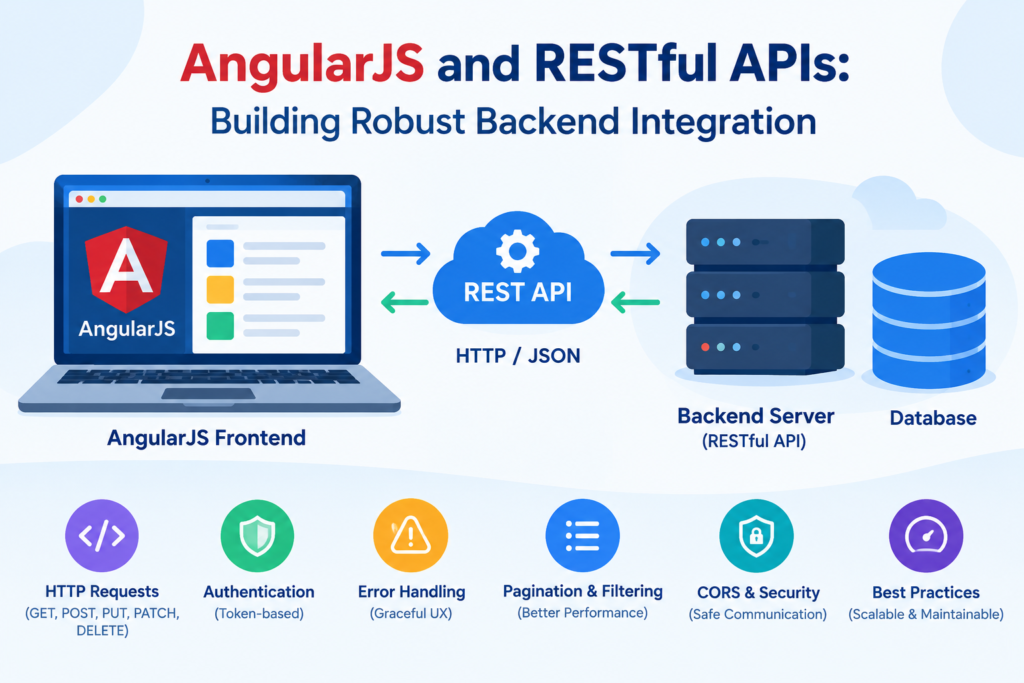
AngularJS and REST API Architecture
A typical application might follow this structure:
AngularJS Frontend
        |
        | HTTP / JSON
        ↓
RESTful API
        |
        ↓
Business Logic
        |
        ↓
Database
This architecture separates responsibilities between the frontend and backend.
The AngularJS application handles the presentation layer, while the REST API provides data and business operations. This separation can also make it easier to create additional clients, such as mobile applications, that consume the same API.
Conclusion
AngularJS and RESTful APIs provide a practical architecture for building data-driven web applications. AngularJS’s $http service, services, interceptors, and promise-based request handling make it possible to communicate with backend APIs efficiently.
For a robust integration, developers should focus on clean API architecture, consistent responses, authentication, error handling, validation, pagination, security, and performance.
Although AngularJS is a legacy framework and is no longer the preferred choice for many new projects, understanding its REST integration patterns remains valuable when maintaining or modernizing existing AngularJS applications. The underlying REST principles are also applicable to modern frontend frameworks and backend technologies.
If you’re maintaining an existing AngularJS application, a well-structured REST API can help improve maintainability while providing a path toward gradually modernizing the frontend.
