Linux for Developers: Creating Powerful Applications is a comprehensive guide that aims to help developers harness the power of Linux to create robust and efficient applications. The book starts by introducing the basics of Linux, including its history, architecture, and various distributions. It then dives into the essential tools and techniques that developers need to […]
Category Archives: Uncategorized
Here is a step-by-step tutorial on how to dockerize a Jenkins CI/CD pipeline: Step 1: Install Docker – Make sure Docker is installed on your machine. You can download and install Docker from the official website. Step 2: Set up Jenkins – Download and install Jenkins on your machine. You can download Jenkins from the […]
Linux containers are a lightweight form of virtualization that allow for the isolation and packaging of applications and their dependencies. Docker is a popular open-source platform that simplifies the creation and management of Linux containers. It provides a way to package an application and its dependencies into a container image, which can then be run […]
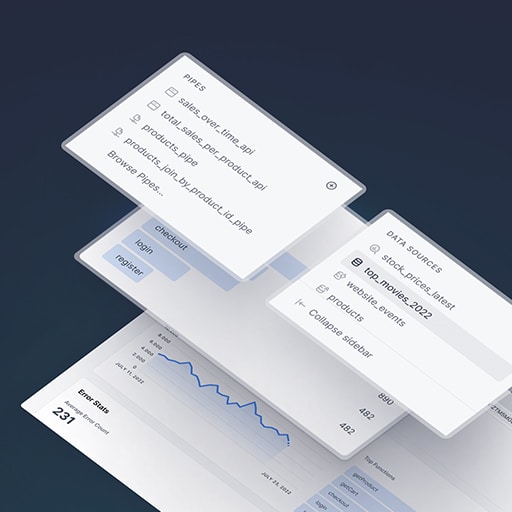
To build a real-time dashboard with Node.js and React, you will need to follow these steps: 1. Set up a Node.js project: Start by creating a new directory for your project and initialize it as a Node.js project using npm or yarn. This will create a package.json file that will track your project’s dependencies. 2. […]
Here is a step-by-step tutorial on how to dockerize a HAProxy load balancer: Step 1: Install Docker Make sure you have Docker installed on your machine. You can download and install Docker from the official Docker website. Step 2: Create a Dockerfile Create a new file called Dockerfile in a directory of your choice. This […]
The Node.js ecosystem is vast and constantly evolving, with a wide range of tools and libraries available to help developers build robust and scalable applications. In this article, we will explore some of the essential tools and libraries that every Node.js developer should be familiar with. 1. Express.js: Express.js is a fast and minimalist web […]
Steps to dockerize an Apache web server: Step 1: Install Docker First, make sure you have Docker installed on your machine. You can download and install Docker from the official Docker website. Step 2: Create a Dockerfile Create a new file called Dockerfile in your project directory. This file will contain the instructions for building […]
Building scalable web applications with Node.js involves using various techniques and tools to ensure that the application can handle a large number of concurrent users and requests without sacrificing performance. Here are some key considerations and best practices for building scalable web applications with Node.js: 1. Use asynchronous programming: Node.js is built on an event-driven, […]
Here is a step-by-step tutorial on how to dockerize an Elasticsearch database: Step 1: Install Docker – Make sure you have Docker installed on your machine. You can download and install Docker from the official website (https://www.docker.com/get-started). Step 2: Create a Dockerfile – Create a new file called "Dockerfile" in your project directory. – Open […]

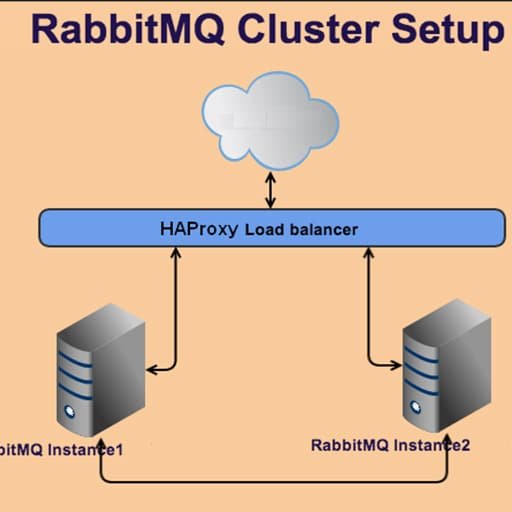
Here is a step-by-step tutorial on how to dockerize a RabbitMQ cluster: Step 1: Install Docker – Install Docker on your machine by following the official Docker installation guide for your operating system. Step 2: Create a Dockerfile – Create a new directory for your RabbitMQ cluster and navigate to it. – Create a file […]

Building a music streaming service with Ruby on Rails involves several steps. Here is a high-level overview of the process: 1. Set up a new Rails application: Start by creating a new Rails application using the `rails new` command. This will generate the basic structure and files needed for your project. 2. Design the database […]

Node.js is a popular runtime environment for building server-side applications using JavaScript. While it is not traditionally associated with machine learning, it can be used to integrate machine learning libraries like TensorFlow and build powerful ML applications. TensorFlow is an open-source machine learning framework developed by Google. It provides a wide range of tools and […]

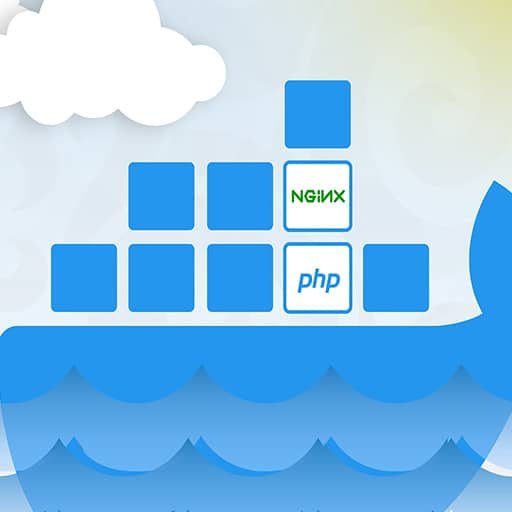
Here is a step-by-step tutorial on how to dockerize an Nginx web server: Step 1: Install Docker Make sure you have Docker installed on your system. You can download and install Docker from the official Docker website. Step 2: Create a Dockerfile Create a new file called Dockerfile in your project directory. This file will […]
Linux Networking: Building and Managing Networks with Ease is a comprehensive guide that provides step-by-step instructions and practical examples for building and managing networks using Linux operating systems. The book covers various networking concepts, including IP addressing, subnetting, routing, and network protocols. It also explores different network services, such as DNS, DHCP, FTP, and SSH, […]
Here is a step-by-step tutorial on how to dockerize a Kafka cluster: Step 1: Install Docker – Make sure you have Docker installed on your machine. You can download and install Docker from the official website. Step 2: Create a Dockerfile – Create a new directory for your Kafka cluster and navigate to it. – […]
Linux in the Cloud: Harnessing the Power of Virtualization In recent years, cloud computing has become increasingly popular as businesses and individuals seek more flexible and scalable solutions for their computing needs. One of the key technologies that enables cloud computing is virtualization, and Linux has emerged as a leading operating system for running virtualized […]
Here is a step-by-step tutorial on how to dockerize an Elasticsearch cluster: Step 1: Install Docker – Make sure you have Docker installed on your machine. You can download and install Docker from the official website (https://www.docker.com/get-started). Step 2: Create a Dockerfile – Create a new directory for your Elasticsearch cluster and navigate to it. […]
When it comes to testing Node.js applications, there are several tools and techniques available that can help ensure the quality and reliability of your code. Here are some of the commonly used ones: 1. Testing frameworks: There are several testing frameworks available for Node.js, such as Mocha, Jest, and Jasmine. These frameworks provide a structure […]
Sure! Here is a step-by-step tutorial on how to dockerize a Redis database: Step 1: Install Docker Make sure you have Docker installed on your machine. You can download and install Docker from the official website (https://www.docker.com/get-started). Step 2: Create a Dockerfile Create a new file called "Dockerfile" in your project directory. This file will […]
Linux Networking: Building and Managing Networks is a comprehensive guide that covers the fundamentals of networking in a Linux environment. It is designed for both beginners and experienced Linux users who want to learn how to build and manage networks using Linux. The book starts with an introduction to networking concepts and protocols, including TCP/IP, […]
To create a music streaming platform with Ruby on Rails, you can follow these steps: 1. Set up your development environment: – Install Ruby on Rails on your machine. – Set up a database (e.g., PostgreSQL) for storing music data. 2. Create a new Rails application: – Open your terminal and run the command `rails […]
When it comes to testing Node.js applications, there are several tools and best practices that can help ensure the quality and reliability of your code. Here are some of the most commonly used tools and best practices for testing Node.js applications: 1. Testing frameworks: There are several popular testing frameworks available for Node.js, such as […]
To implement search functionality in Ruby on Rails, you can follow these steps: 1. Add a search form to your view: – In your view file (e.g., `index.html.erb`), add a form that allows users to enter their search query. For example: “`ruby <%= form_tag search_path, method: :get do %> <%= text_field_tag :query, params[:query], placeholder: "Search…" […]
To build a RESTful API with Node.js and Express, follow these steps: 1. Set up a new Node.js project by creating a new directory and running `npm init` to generate a `package.json` file. 2. Install Express by running `npm install express`. 3. Create a new file, such as `index.js`, and require Express: “`javascript const express […]
Creating a blogging platform with Node.js and Express can be a great way to showcase your web development skills and provide a platform for users to share their thoughts and ideas. In this guide, we will walk through the steps to set up a basic blogging platform using Node.js and Express. Step 1: Set up […]
To create a recipe sharing platform with Ruby on Rails, you can follow these steps: 1. Set up your Ruby on Rails environment: – Install Ruby on your system. – Install Rails using the command `gem install rails`. – Create a new Rails application using the command `rails new recipe-sharing-platform`. 2. Design your database schema: […]
Node.js and MongoDB are indeed a perfect match for database-driven applications. Here’s why: 1. Asynchronous and Non-blocking: Node.js is known for its asynchronous and non-blocking nature, which makes it ideal for handling database operations. MongoDB, being a NoSQL database, also supports asynchronous operations. This combination allows for efficient handling of multiple concurrent requests, resulting in […]
Linux shell scripting is a powerful tool for automating tasks and increasing efficiency in a Linux environment. With shell scripting, you can write a series of commands and instructions that can be executed in a sequential manner, saving time and effort. Here are some ways in which Linux shell scripting can help automate tasks for […]
Here is a step-by-step tutorial on how to dockerize a PostgreSQL database: Step 1: Install Docker – Make sure you have Docker installed on your machine. You can download and install Docker from the official website (https://www.docker.com/get-started). Step 2: Create a Dockerfile – Create a new file called "Dockerfile" in your project directory. – Open […]
To build a job board with Ruby on Rails, you can follow these steps: 1. Set up a new Rails application by running the following command in your terminal: “` rails new job_board “` 2. Change into the project directory: “` cd job_board “` 3. Generate a scaffold for the job model, which will create […]
Here is a step-by-step tutorial on how to dockerize a MySQL database: Step 1: Install Docker – Make sure you have Docker installed on your machine. You can download and install Docker from the official website (https://www.docker.com/get-started). Step 2: Create a Dockerfile – Create a new file called "Dockerfile" in your project directory. – Open […]
1. Keep your dependencies up to date: Regularly update your Node.js dependencies to ensure you have the latest security patches and bug fixes. Use a package manager like npm to manage your dependencies and easily update them. 2. Use secure coding practices: Follow secure coding practices to minimize vulnerabilities in your code. This includes validating […]
Node.js and MongoDB are indeed a perfect match for database integration. Here are a few reasons why: 1. JavaScript-based: Both Node.js and MongoDB use JavaScript as their primary programming language. This makes it seamless to work with both technologies, as developers can use the same language for both the server-side and database operations. 2. Asynchronous […]
To build a chat application with Node.js and WebSockets, you can follow these steps: 1. Set up a new Node.js project by creating a new directory and running `npm init` to generate a `package.json` file. 2. Install the necessary dependencies by running the following command: “` npm install express socket.io “` 3. Create a new […]
Ruby on Rails is a powerful web development framework that can be used to create data visualization applications. Here are some steps to get started with data visualization using Ruby on Rails: 1. Install Ruby on Rails: First, make sure you have Ruby and Rails installed on your machine. You can install them using the […]
When it comes to deploying Node.js applications to the cloud, three major cloud providers stand out: AWS (Amazon Web Services), Azure (Microsoft Azure), and Google Cloud. Each of these platforms offers its own set of features and benefits, so let’s compare them: 1. AWS: – AWS Elastic Beanstalk: This service allows you to easily deploy […]
Ruby on Rails is a popular web development framework that allows developers to build robust and scalable applications quickly. In this guide, we will explore how to build real-time chat applications using Ruby on Rails. To get started, make sure you have Ruby and Rails installed on your machine. You can check your Ruby version […]
Here is a step-by-step tutorial on how to dockerize a MongoDB database: Step 1: Install Docker – Make sure you have Docker installed on your machine. You can download and install Docker from the official website (https://www.docker.com/get-started). Step 2: Create a Dockerfile – Create a new file called "Dockerfile" in your project directory. – Open […]
Securing Docker containers is crucial to protect your applications and data from potential threats. Here are some best practices and tips to enhance the security of your Docker containers: 1. Use Official Images: Always use official Docker images from trusted sources like Docker Hub. These images are regularly updated and maintained by the Docker community, […]
To implement Role-Based Access Control (RBAC) in Ruby on Rails, you can follow these steps: Step 1: Set up the database tables Create the necessary database tables to store roles, permissions, and user-role mappings. You can use a migration file to create these tables. For example: “`ruby rails generate migration CreateRoles name:string rails generate migration […]
To build a task management system with Ruby on Rails, you can follow these steps: 1. Set up a new Rails application by running the following command in your terminal: “` rails new task_management_system “` 2. Change into the project directory: “` cd task_management_system “` 3. Generate a Task model and migration file: “` rails […]
Node.js and MongoDB are two powerful technologies that can be used together to build full-stack JavaScript applications. In this tutorial, we will walk through the process of building a simple application using these technologies. Prerequisites: – Basic knowledge of JavaScript – Node.js and npm installed on your machine – MongoDB installed on your machine Step […]
Linux Server Administration: Essential Skills for System Administrators is a book that focuses on the fundamental skills required to effectively manage and administer Linux servers. It covers a wide range of topics, including installation and configuration, user and group management, file system management, network configuration, security, and troubleshooting. The book starts with an introduction to […]
Sure! Here is a step-by-step tutorial on how to dockerize an Express.js application: Step 1: Install Docker First, make sure you have Docker installed on your machine. You can download and install Docker from the official website (https://www.docker.com/get-started). Step 2: Create a new directory for your project Create a new directory for your Express.js application. […]
To create a chat application with Ruby on Rails, you can follow these steps: 1. Set up a new Rails application by running the following command in your terminal: “` rails new chat_app “` 2. Change into the newly created application directory: “` cd chat_app “` 3. Generate a model for the chat messages: “` […]
Linux gaming has come a long way in recent years, unlocking a world of possibilities for gamers who prefer this open-source operating system. With the rise of Steam’s Proton compatibility layer and the increasing support from game developers, Linux users can now enjoy a wide range of games without having to switch to Windows. One […]
Sure! Here is a step-by-step tutorial on how to dockerize a Spring Boot application: Step 1: Create a Spring Boot Application Start by creating a new Spring Boot application. You can use the Spring Initializr (https://start.spring.io/) to generate a basic Spring Boot project with the necessary dependencies. Step 2: Build the Spring Boot Application Build […]
Sure! Here is a step-by-step tutorial on how to dockerize a Flask application: Step 1: Install Docker First, make sure you have Docker installed on your machine. You can download and install Docker from the official website (https://www.docker.com/products/docker-desktop). Step 2: Create a Flask Application Create a new directory for your Flask application and navigate to […]
Scaling Ruby on Rails applications for high traffic can be a challenging task, but with the right strategies and techniques, it is possible to handle large amounts of traffic efficiently. Here are some tips for scaling Ruby on Rails applications: 1. Optimize database queries: One of the most common bottlenecks in Rails applications is the […]
Integrating payment gateways in Ruby on Rails involves several steps. Here is a general guide on how to do it: 1. Choose a Payment Gateway: There are several payment gateways available, such as Stripe, PayPal, Braintree, etc. Choose the one that suits your requirements and sign up for an account. 2. Install the Payment Gateway […]