Business & Technology
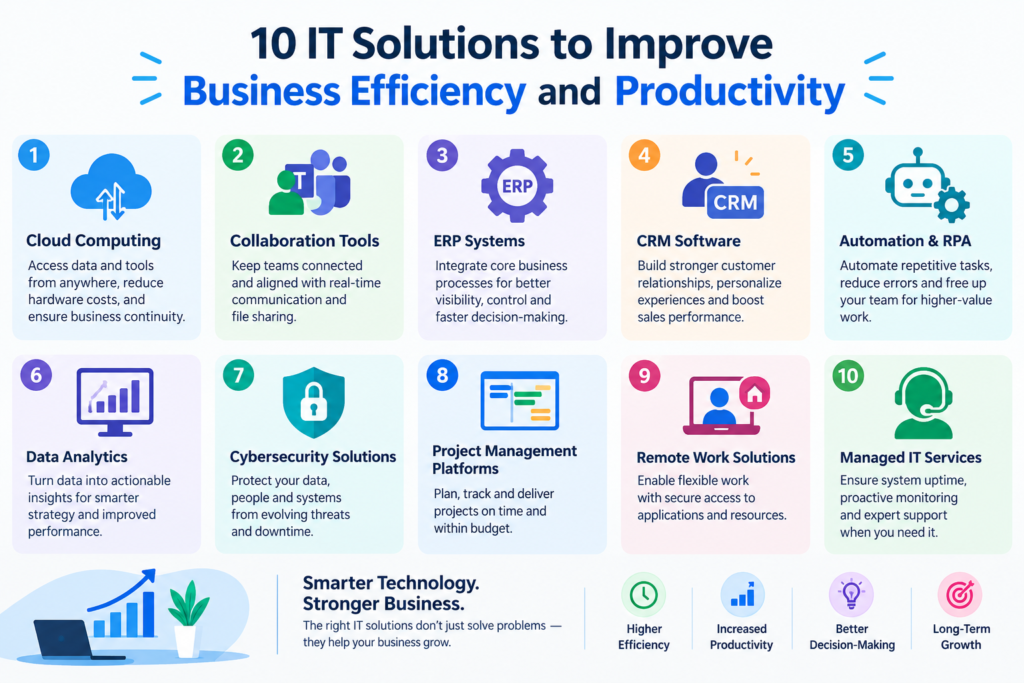
10 IT Solutions to Improve Business Efficiency and Productivity
Aug
In today’s competitive business environment, technology is no longer simply a support function. The right IT solutions can help businesses automate repetitive tasks, improve communication, protect important data, reduce operating costs, and serve customers more effectively.
Whether you run a small business, startup, e-commerce store, professional service company, or growing enterprise, investing in the right technology can significantly improve productivity.
However, choosing the right tools can be challenging. There are thousands of software platforms, cloud services, automation tools, cybersecurity products, and business applications available today.
To make the decision easier, here are 10 IT solutions that can help businesses improve efficiency and create a more productive digital workplace.
1. Cloud Computing Solutions
Cloud computing allows businesses to store data, run applications, and access computing resources over the internet instead of relying entirely on local servers.
Cloud-based solutions can make it easier for employees to access files and applications from different locations while reducing the need for expensive on-premises infrastructure.
Benefits of cloud computing
- Access business data from anywhere
- Reduce hardware and maintenance costs
- Improve collaboration
- Scale resources as the business grows
- Simplify backups and disaster recovery
- Support remote and hybrid work
Businesses can use cloud platforms for file storage, databases, hosting, email, applications, backups, and much more.
For many small businesses, moving selected services to the cloud can be a practical first step toward improving IT efficiency.
2. Business Process Automation
Many businesses still spend valuable employee time on repetitive tasks such as sending emails, creating reports, entering data, processing forms, and updating records.
Business automation can reduce the amount of manual work required.
For example, a company could automatically:
- Send order confirmation emails
- Generate invoices
- Assign leads to sales representatives
- Send appointment reminders
- Update customer records
- Create regular reports
- Notify employees about important tasks
Automation doesn’t necessarily mean replacing employees. Instead, it allows employees to spend more time on tasks that require creativity, decision-making, and human interaction.
3. Customer Relationship Management (CRM)
A CRM system helps businesses organize and manage interactions with existing and potential customers.
Instead of keeping customer information across spreadsheets, emails, and different applications, a CRM can centralize important information in one place.
A typical CRM can help businesses manage:
- Leads
- Customer information
- Sales opportunities
- Follow-ups
- Communication history
- Support requests
- Sales pipelines
A well-configured CRM can prevent leads from being forgotten and help sales teams follow up at the right time.
For businesses focused on growth, a CRM can become an important part of the overall IT infrastructure.
4. Project Management Software
Managing multiple projects through emails and spreadsheets can quickly become complicated.
Project management software gives teams a centralized place to organize work, assign responsibilities, monitor deadlines, and track progress.
Useful project management features may include:
- Task management
- Team collaboration
- Deadlines
- File sharing
- Project dashboards
- Notifications
- Time tracking
- Progress reports
For remote and distributed teams, project management platforms can also improve visibility into what each team member is working on.
The goal is simple: make it clear what needs to be done, who is responsible, and when it needs to be completed.
5. Cybersecurity Solutions
As businesses become increasingly dependent on technology, cybersecurity becomes essential.
A security incident can result in data loss, downtime, financial damage, and reputational problems.
Businesses should consider implementing multiple layers of security, including:
- Firewalls
- Endpoint protection
- Secure passwords
- Multi-factor authentication
- Regular software updates
- Data backups
- Access controls
- Security monitoring
- Employee security awareness training
Cybersecurity isn’t only important for large companies. Small businesses can also become targets because they may have valuable customer information but fewer security resources.
A proactive cybersecurity strategy can help reduce unnecessary risks and protect critical business systems.
6. Website and E-Commerce Solutions
A business website is often the first interaction a potential customer has with a company.
A modern website should be:
- Mobile-friendly
- Fast-loading
- Secure
- Easy to navigate
- Search-engine friendly
- Simple to maintain
For businesses selling products or services online, an e-commerce platform can provide additional functionality such as product management, online payments, inventory management, customer accounts, and order tracking.
A well-designed website can also automate parts of the sales and customer-support process.
For example, customers can find information, submit inquiries, book appointments, purchase products, or download documents without contacting an employee for every step.
7. Artificial Intelligence and AI Automation
Artificial intelligence is becoming an increasingly useful business technology.
Businesses can use AI to assist with tasks such as:
- Content generation
- Customer support
- Data analysis
- Document processing
- Email assistance
- Research
- Lead qualification
- Internal knowledge search
- Workflow automation
AI chatbots can answer common customer questions, while AI-powered tools can help employees summarize documents, analyze information, and automate repetitive processes.
However, businesses should implement AI carefully. Sensitive information should be handled according to appropriate privacy and security requirements, and important decisions should receive human oversight.
The best approach is often to identify repetitive, time-consuming workflows first and then determine whether AI can improve them.
8. Data Backup and Disaster Recovery
Business data can be lost because of hardware failure, accidental deletion, cyberattacks, software problems, or other unexpected events.
A reliable backup strategy can significantly reduce the impact of such incidents.
Businesses should consider:
- Automated backups
- Off-site or cloud backups
- Multiple backup copies
- Regular backup testing
- Disaster recovery procedures
- Defined recovery priorities
Having a backup is not enough. Businesses should also verify that backups can actually be restored.
A simple disaster recovery plan can answer important questions such as:
What happens if our server goes down?
How quickly can we restore our website?
Where are our critical business files stored?
Who is responsible for recovery?
Planning these processes before an incident occurs can save valuable time.
9. Communication and Collaboration Tools
Effective communication is essential for productive teams.
Modern collaboration tools can help employees communicate through instant messaging, video meetings, shared documents, calendars, and task management systems.
Instead of relying entirely on long email threads, teams can use dedicated collaboration platforms for different types of communication.
For example:
- Chat for quick questions
- Video meetings for discussions
- Shared documents for collaboration
- Project tools for tasks
- Email for formal communication
The objective isn’t to add more software. It is to create a communication system that makes information easier to find and reduces unnecessary meetings and messages.
10. IT Monitoring and Maintenance
Technology problems can quickly become expensive when they aren’t detected early.
Regular IT monitoring and maintenance can help businesses identify issues before they become major problems.
IT maintenance may include:
- Website monitoring
- Server monitoring
- Security updates
- Software updates
- Database maintenance
- Performance optimization
- Backup monitoring
- Malware detection
- Uptime monitoring
For websites and online businesses, performance is particularly important. A slow or unavailable website can result in lost visitors, leads, and sales.
Proactive maintenance is generally better than waiting for something to break.
How to Choose the Right IT Solutions for Your Business
Every business has different requirements. A solution that works well for one company may not be suitable for another.
Before investing in new technology, consider the following questions.
What problem are you trying to solve?
Don’t adopt software simply because it is popular.
First identify the actual problem.
For example:
“Our employees spend several hours every week manually creating reports.”
This is a much better starting point than:
“We need AI.”
Once the problem is clear, you can evaluate technologies that can solve it.
How many employees will use it?
Consider the size of your team and how people will use the system.
A solution designed for a large enterprise may be unnecessarily complicated for a small business.
Can it integrate with your existing systems?
Integration is important.
Your CRM, website, accounting software, email platform, payment system, and other business applications should ideally work together where appropriate.
Poor integration can create additional manual work instead of reducing it.
Is the solution scalable?
Choose technology that can grow with your business.
If you expect your company to expand significantly, consider whether the platform can support additional users, customers, transactions, and data.
What is the total cost?
Don’t look only at the initial purchase price.
Consider:
- Subscription fees
- Implementation costs
- Maintenance
- Training
- Integration
- Security
- Support
- Future upgrades
The cheapest option isn’t always the most cost-effective solution.
The Importance of IT Integration
One of the biggest challenges businesses face is having too many disconnected tools.
For example, imagine a business where:
- Website leads go to one system
- Customer information is stored in a spreadsheet
- Sales information is kept in another application
- Invoices are created manually
- Support requests arrive by email
Employees may spend considerable time moving information between systems.
Integrating these processes can create a more efficient workflow.
For example:
Website → Lead Capture → CRM → Sales Follow-up → Invoice → Customer Support
Automation and integration can reduce manual data entry while improving visibility across the business.
Start Small and Measure Results
Businesses don’t need to implement every technology solution at once.
A better approach is to identify the biggest sources of inefficiency and address them one at a time.
For example:
Step 1: Identify a repetitive process.
Step 2: Measure how much time it currently takes.
Step 3: Find a suitable technology solution.
Step 4: Implement and test it.
Step 5: Measure the results.
Step 6: Improve the workflow.
This approach helps businesses avoid unnecessary technology investments and makes it easier to demonstrate the return on investment.
Final Thoughts
The right IT solutions can help businesses save time, reduce repetitive work, improve security, increase productivity, and deliver better customer experiences.
Cloud computing, automation, CRM systems, project management software, cybersecurity, websites, AI, backups, collaboration tools, and proactive IT maintenance are among the most valuable areas to consider.
However, technology itself isn’t the goal. Business efficiency is the goal.
The best IT strategy is one that starts with your business challenges and uses technology to solve them in a practical, measurable, and scalable way.
Whether you’re a small business or a growing company, reviewing your existing technology and identifying opportunities for automation and improvement can be an excellent first step toward building a more efficient digital business.
